Sell Subscriptions Online
Create subscription products in SellApp with recurring prices, billing intervals, supported payment methods, and subscription tracking.
With SellApp, you can sell subscriptions online by creating products with recurring prices. Customers are charged at a predefined period of time, for example: daily, weekly, monthly, or yearly.
This pricing type is ideal for digital products that require continuous maintenance and effort, with good examples being SaaS software, paid communities, memberships, and resources that are updated regularly.
Let's dive into how you can create a product with a recurring subscription.
Create a Subscription Product
- Start by creating or editing a product in the product dashboard.
- In the "Pricing" section, select "Subscription" as the pricing type.
- Once you've enabled the subscription pricing type, you can proceed to set your price and duration for the subscription.
- Here's a preview of what that looks like:
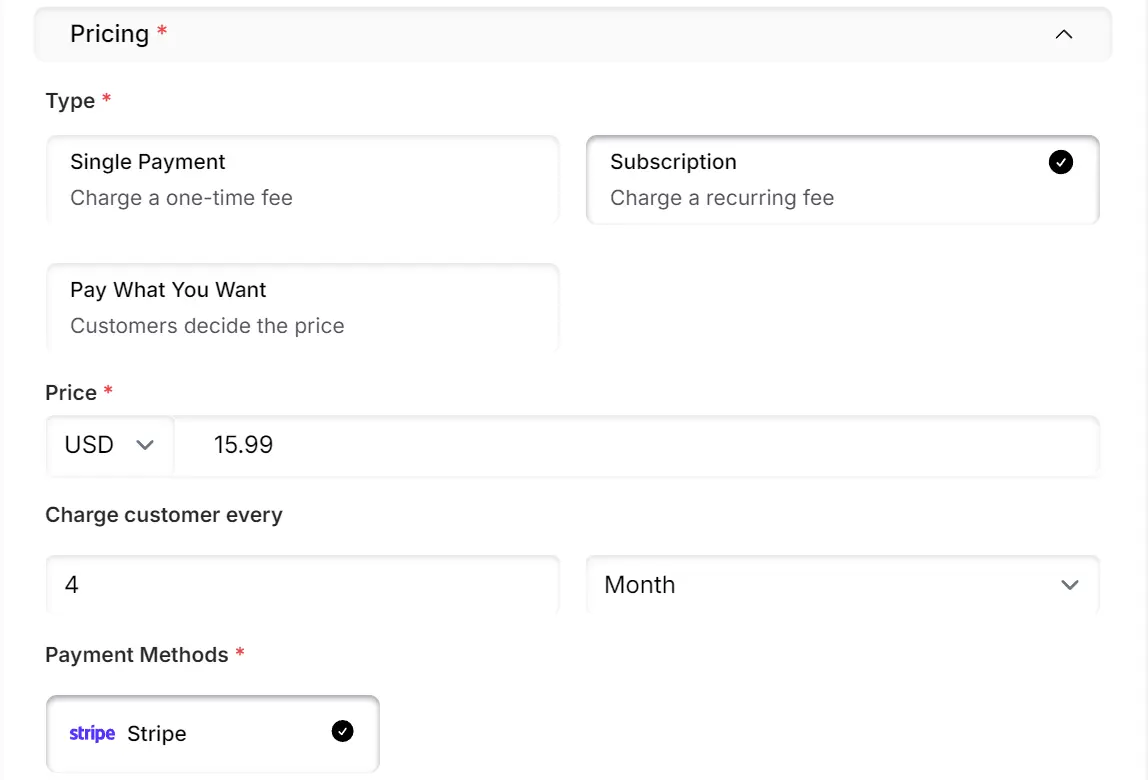
- Specify any kind of subscription duration you'd like. Charge customers every X days, weeks, months, or years. The highest duration supported is currently 365 days, 52 weeks, 12 months, or 1 year, so you cannot set the duration to be more than a year.
- Once saved, customers can purchase this newly created subscription product.
- We'll handle setting up the subscription and notifying the customer if a payment happens to fail.
- You'll be able to see how many subscriptions are active and how many payments have been made in your SellApp subscription dashboard
Control renewal delivery
Each subscription variant has a Redeliver on renewal setting under Subscription lifecycle. It is enabled by default.
Keep it enabled when customers should receive the plan's deliverables again after every successful renewal. Disable it when the renewal should extend access without reissuing downloadable files, serials, bundle items, or other one-time fulfillment.
This setting does not stop billing or cancel the subscription. Renewals still create their normal order record and send renewal notifications and webhooks. The policy follows the customer's current plan variant, including after a supported plan change.
Manage subscriptions
Open Subscriptions to review active subscriptions and open a subscription detail page. Depending on the payment provider and subscription state, you can cancel, pause, resume, change the renewal date, or review pending lifecycle actions.
Customers can manage supported actions from the customer portal. Some actions are intentionally customer-only because the customer owns the payment instrument or must approve a provider redirect.
For API integrations, use the Subscriptions API to check capabilities before showing lifecycle actions. The API supports idempotency for retries through the Idempotency-Key header or idempotency_key request field.